Dance Musings and Necessity

I so often say that “necessity is the mother of invention”…and for me, that’s true.  Many of the things I figure out or create are because I’m frustrated or keep saying “there must be a better way to do this”.  Eventually, I reach that moment when the scale tips and I find a way.

This leads to that other saying “find a way or make a way”…so I often do.  Most aren’t overly complex, I’m not a master scripter, but they are little routines, scripts, and objects that make creating easier for me.

So…my frustration this weekend.  I’m working on a heavy choreo piece.  I have a notecard that lists the animations in my choreo huds (another script invention out of frustration) and a notecard with notes.  As I create my sequence, I copy the animation name from the notecard instead of digging into inventory or hud contents for the exact name.  Every time I had to relog, I had to go dig these notecards out of my inventory.  After the 5th time of doing this…I’d had enough!  Little did I know the solution was staring me right in the face!

I desperately wanted to have quick links to my notecards or SOMETHING… then it hit me.  If I put the notecard in one of my dance huds, I could just go to contents and open it right from the screen – woot!  Then I thought more…sometimes I change my choreo huds when I add animations…soooo…

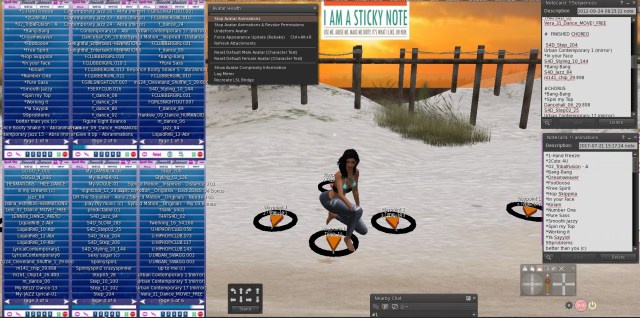
I created a square prim, slapped a picture of a sticky note on it, shrunk it down, and attached it as a hud to my screen!  I can now right click on it, drag full perm notecards from my inventory to it and open it from there!  Best thing, you can leave the notecard open on your window and close the edit window so you can keep working!   You can also open the HUD contents, delete and drag full perm notecards from inventory while you’re wearing it.  A friend said it best – it’s like having a file cabinet on your screen.  *Note: if you change a notecard, make sure to save it before changing costumes, logging out, etc.

When I work on choreo for dance, I toss on the costume (or something close to it), put on my choreo huds and save it as an outfit for that dance – such as CHOREO – Barefoot.  I re-saved my outfit, so when I’m ready to work on choreography for that dance – bam!  My notecards listing animations and notes are right there accessible on my screen…no annoying delays when I want to create and no sorting through my exploding-slowly becoming disorganized again-inventory.  I save the hud that has the notes in the dance folder in my inventory, so it’s unique and I can find it if I need to.

Chatting with the same friend, the thought expanded!  How many times are you performing in a show and you want to keep the show order notecard on your screen, or a notecard of the effects, or anything?  How many times do you accidentally close that notecard, facepalm and have to look for it again?  I do this  A LOT.  So now, I’m going to toss those notecards into another sticky note hud for that dance/show, save it to the outfit, and there they are!

The amazing thing?  This makes it sooo much easier and less distracting for me – it’s free – no scripts needed – and I can always make or upload different images if I want different sticky note huds.  (I like pictures!)  I can have as many different style “file cabinets” as I want!  <– insert happy dance.  Ohh…the simple things that can make us so happy!  The other thing?  This hud can be tiny.  As long as you can see it, right click, and go to contents you’re good to go.

BUT….was I done yet?  NOPE

When I work on choreography, I wear multiple copies of my one choreography hud on my screen, each flipped to a different page of animations.  I wear another copy I name “MAIN CHOREO – <dance name>” (this is the one I use for creating the sequence).  As I work through my choreography and start to develop my list of animations to use for each section of music, I keep my main choreo sequences notecard open – frequently saving and reloading the sequence tab as I test and test again.  (Audacity is awesome for repeating sections of music, stopping and starting at different places btw.)

Well, more times than I can count, when I finished picking my animations, putting them in order on the sequences card, and start practicing, I wonder “what the hell was I thinking?”  so I started putting a blank line between the animations for each music section.

Yesterday, I got brave.  I finally stopped thinking “it might break!”  and I started putting comments in between, like this:

#chorus
animation..
animation…
animation…

#2:04 men
animation…
animation…

#2:04 women
animation..
animation..

etc.

When I’m practicing my choreography before I record, I have my sequences card open on my screen, so that I can follow what animations I wanted to use for each section.  (It’s amazing how quickly I can forget!)  Eventually when I’ve practiced enough that I reach this point:

“Don’t practice until you get it right, practice until you (almost) can’t get it wrong”

then I know it, I feel it, and I record it.  Funny how when you press that record button your mind goes blank and your fingers go wonky, hence why I added the almost!

So…..

Over the years I’ve developed a flow that helps me create and focus on the parts I enjoy the most.  Some things that work for me may not work for others and that’s just the way it should be.  We can each create our own routine, our own flow, what works for us individually so that hopefully dance performance in SL is a joy of creativity and expression.  I learn new things every day, from others, from myself, and also about myself.

Dance from the heart, dance from the soul, and breathe

~ Eva
 

ffd1ea993298b100b1801fbf08cc5985

Posted in Dance Resources | 2 Comments

Moving Objects with Choreo Designer

Moving objects with Choreo Designer –

My “ancient Chinese secret”…and… how I moved this bathtub up on stage for this dance!

Moving objects with Spot On Choreo Designer is easier than you think and can add significant impact in a dance.  Below I will detail step by step how to do it, and expand on how it interacts with the Stage Manager and Performance Director if you use them.

Step 1:  Determine what object(s) you would like to move.  The only requirement is it must have modify permissions.  Note: you CAN link and move objects, such as a little linked gnome army.  (side artistic note here:  any effect you add to a performance should enhance it.  Just because you can, doesn’t mean you should.  Always consider the impact it will have and if it contributes to the overall expression of your performance.)

take-action-button
Determine what objects you would like to move.  If they will move together, link them.    

Step 2:  Determine where the starting positions for your objects will be, and put them into position,  whether this is on the set or below because it rises up (or down) during your dance.  It is much easier if you start with it in the exact position you need for the performance.

take-action-button
Determine the starting positions for your objects, especially if they will be “entering your set” from below, above, behind, etc.  Example:  columns rising through the fog floor of your set.  Place them in the starting position.

Step 3:  Moving an object with the Choreo Design system is very similar to moving a dancer.  Because the object can’t sit on a mover, you will be linking a mover to the the object.  You will use a designer ring and create waypoints just as you would for a dancer.   Each object (linked or not) will need it’s own mover and route.  Example:  If you have 2 gnomes and 3 trolls and they will all be moving independently of each other, you’ll need 5 movers and 5 rings – just like you would if they were dancers…except they can’t twerk.  I prefer to place my movers on top of an object so that I can see the mover, ring, and waypoints – which is more difficult for me if placed underneath.

take-action-button
Rez a designer ring for your object.  I recommend centering the ring over the top of your object, placing it as close as possible so it appears to be resting on top of it.  Repeat this for each object that will be moving independently.

Step 4:  It’s time to rez a mover and link it.  We’ll go into mover details about the movement card inside the mover later, but it is very similar to a dancer movement card.  The mover must be the “root” prim.  When linking objects together, the last object selected is the “root prim”.  This is where primary scripts go, where the linked object gets it’s name, and also defines some of the object properties like phantom and permissions.  By making the mover the root prim, you’ll also easily be able to view the contents in edit mode and modify your movement card.

take-action-button

Click on your designer ring, and select “Rez Mover”.  Right click and select edit on the object you will be moving so that it is selected, then press your shift key and click on the mover.  You should see both highlighted.  In the edit window, click on “Link” to link both objects together.  It is important to click the object first and the mover second.

Step 5:  Your “dancer” (i.e. object) is now “on its pad” and you are ready to build a route.  Click on your designer ring and add a waypoint.  Think of the object just as you would a dancer, and create the route in the same way.  Where will it move to?  How much time should it take from the current waypoint to the next?  Does it need to sleep, rotate?

take-action-button

Click on your designer ring and add a waypoint.  Create your waypoints exactly as you would for a dancer.  Continue adding waypoints, setting position, rotation, travel time and sleep time until complete.

Step 6:  Once you’ve defined your route, it’s time to get the notecard from your Designer Ring.  Click on Get Notecard on your ring.

take-action-button
Click on your designer ring and click “Get Notecard”


Step 7:  Open the movement card in the mover linked to your object.  For now you do not need any commands such as @text, @spot_dancer, etc.  Simply paste everything from local chat, starting with #BEGIN NOTECARD through #END NOTECARD.  Paste this over everything currently in the movement card.

take-action-buttonOpen the movement card in the mover linked to your object, paste all of the route information from local chat into the movement card, replacing everything already there.

Step 8:  Rename the movement card to match the card names used in your dancer’s movers.  Example:  if the movement card name is “Standing PD” in the movers for your five dancers, rename the movement card in your object mover to Standing PD also.  Whatever it is, the card names should all match whether it’s a dancer or object.

take-action-button
Rename the movement card in your object mover to the same card name used for your dancer movers.

Step 9:  Time to test!  Your object mover is the same as a dancer.  If you press play on the standard choreography design system HUD, your object movers will start to play just as your dancer movers will.  If you are using a Performance Director HUD, once you begin your routine, your object movers will also be activated if the mover card names match your routine name.

take-action-button
Play your routine, using the standard choreography design system HUD or the Performance Director HUD.  

Step 10:  Make any adjustments to your route that need to be made, time, waypoint positions, etc.  Take a new notecard and update the card in your object mover.

take-action-button
Make any adjustments to the waypoints, take a new notecard and update the object’s mover notecard.

Step 11:  You definitely don’t want to keep looking at that mover sitting on top of your object, but if you try to set it as transparent manually, you will probably find that it keeps coming back into view.  There is a command for this.  Open your mover notecard, and on the first line add @invisible.  Press enter twice after so that there is a blank line between this command and your route data.  Your mover will immediately change to transparent.  To find the mover so that you can make additional updates to the mover card, turn on transparency mode, Ctrl-Alt-T.

take-action-buttonSet your object mover as invisible.  Open the mover card, add @invisible to the first line, press enter twice and save.  If you need to find it again, turn on transparency mode – Ctrl-Alt-T.


That’s it!  You now have objects that will move as part of your performance!


Packing the Objects for Your Performance:

You still need to get the objects where you need to go, right?  You have two key choices:

If you DO NOT use Stage Manager:

Treat your objects exactly as you would any other set prop – put them in a rezzer, restore to last position, etc.  When you play/start your movers, your objects will move from wherever you rez them.

If you DO use Stage Manager:

Stage manager not only allows you to rez your sets, it can act as a “homing beacon” for your movers, always making sure they start in the right position relative to the stage coordinates.

If you had a stage manager set up on your building platform/where you created your object mover notecards, you should have noticed “offsets” at the begin of your waypoint data.  This enables your movers and stage manager to coordinate with each other, and is what makes your movers “pop into starting position” automatically.

When you click on the name of a Routine in the Performance Director, or select a notecard in the standard Choreography Design HUD (there is a small button in the upper right hand corner), this loads the notecard and triggers the offset position, moving your  mover (and linked objects) into place.  This leaves you two options.

  • You can put your moving objects into your rezzer just as you would any other object
  • If you want them out early, and they start off stage, simply rez them at the venue.  They will pop into starting position if you are wearing your HUD and activate that routine/notecard.

If you have multiple moving objects, you can “soft link” them by selecting them all, then taking them (or a copy) into your inventory so that they appear as a coalesced object (the icon looks like a bunch of blocks in inventory).  You can then rez this coalesced object at the dance venue and they will all pop into their starting positions automatically.

(Note:  Stage Manager must be configured for the venue before you rez your moving objects so that they know where to go.  Always set your Stage Manager first.)


Questions and Notes:

  • When using Performance Director:
    • You do not assign a spot_dancer to mover notecards for objects.  They are not dancing.
    • You will not create a group for these objects in your Routine notecard.  The mover notecard simply needs the same name as the Routine notecard so that pressing play will automatically start the object movers.

If you find any issues with the above or anything needs clarification, please feel free to leave a comment.  Have fun and enjoy the creative opportunities in SL!

Dance on!
~ Eva


Posted in Dance Resources | 1 Comment

Thoughts for today…

“When you no longer need approval from others like the air you breathe, the possibilities in life are endless.
What an interesting little prison we build from the
invisible bricks of other people’s opinions.”
― Jacob Nordby

This quote struck a cord for me, so many years of my life spent trying to please others, make them happy.  What did I learn?  That it almost never works, and is fleeting.  That the happiness I gained from it soon drained away leaving me craving more praise, more affirmations, more recognition, and the need to feel needed…wanted.  I let the emotions of others control me, until I didn’t any longer.  I still have my moments, and I still get that warm fuzzy feeling when hearing “good job”…but the difference is, I don’t need it to feel good inside.  I feel good being me (most days, especially after the first cup of coffee).  I feel good when I create something that feels special, when I’ve shared something and can see the light bulb go off over someone’s head, when I dance within someone else’s imagination.  I feel good when I’m alone listening to the piano, or exploring, or creating, or spending time with others.  I feel good when I get out of my own head and let things flow.

Not everyone will understand me, or even appreciate me…and I’m ok with that.  I am who I am, with all my different and crazy pieces, still journeying towards the person I’m meant to be, carrying my bowl of sunshine along the way.  I see y’all out there too – with your different and crazy pieces.

Drink some sunshine!  Embrace your crazy pieces and dance!
~ Eva

Mr. Rogers really knows his stuff:
https://www.buzzfeed.com/delaneystrunk/17-mister-roger-quotes-the-world-really-needs-right-now?utm_term=.tdVrpxb2gV#.hp07ZvxYOq

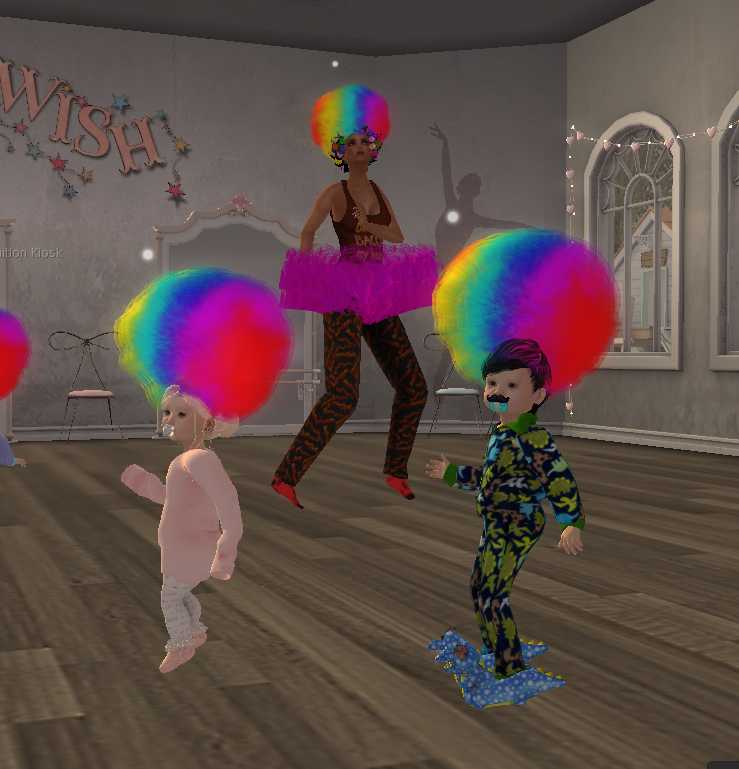
Yes…those ARE bacon pajamas!  The two little darlings Casper and Haddy totally rocking some Michael J.                ~ See the world through the eyes of childlike wonder ~

Posted in Musings | Leave a comment

Smooth Dancer Tip for Choreography!

Smooth Dancer tip for choreography – using timed animations in the middle of your loose animations!

Normally I practice and practice my choreo until I’m ready to play it manually and record (one of my favorite things), BUT today I have two animations that need to flow together seamlessly like they’re one, and they don’t need any music hits.  There’s an AWESOME way to do this I figured out!

Ok…this is new to me, haven’t tried it before…so forgive me for being excited!  Ha!  The first of my two animation is a sexy walk that goes in a circle, then another that does a hip sway on the spot.  I needed to activate the sensual sway exactly as my left foot starts moving forward.  I gave this a shot and it worked!

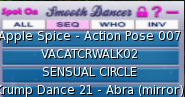
I recorded just the two animations – my sensual and sensual sway so that the second activates at the right time.  I then named and pasted this timed sequence in the middle of my “loose animations”.  (They probably go visit bars at night and bring home strange men.)   This is what my Sequences Card looks like.

My Smooth Dancer Sequences Card:

Apple Spice – Action Pose 007
VACATCRWALK02

SENSUAL CIRCLE=
0.000000|My-SENSUAL-81
11.781810|SENSUAL SWAY

Krump Dance 21 – Abra (mirror)

What my HUD looks like:

Notice it goes right from the action pose, to the walk, to my recorded sequence, and then to the next animation – Krump dance.  Now that I’ve recorded those two animations together so they flow perfectly, I don’t have to do it again!  Woot!

The Best Part:

When I record my dance, Smooth Dancer records the times for those two animations individually – so I get a perfect flow with those two animations AND I can still record my dance all together so it all flows well.

0.000000|VACATCRWALK02
5.127195|My-SENSUAL-81
16.820120|SENSUAL SWAY
23.538220|Krump Dance 21 – Abra (mirror)

Other Possibilities:

This could be super helpful for animations that need to flow together, like pre-jump, jump, and land – or backflips where I like to play a “finishing” animation with them.

If you think about it – it’s almost like you’re creating your own animations which you can easily incorporate into dances.  The possibilities and flexibility is pretty endless.

I hope you found this as useful as I did!

Dance on, people!

~ Eva 🙂


Posted in Dance Resources | 1 Comment

Da da da daaaaa! Here I come to save the daaay!

Well, not really – but I’m back!  I really did need that respite during June – and it’s amazing fun to dance with other choreographers!  Don’t get me wrong, I love choreographing for myself – but there’s something special about being part of someone else’s imagination.

I almost wax poetic just thinking about it.  For some choreographers, my favorite ones, you can tell what they create is pure art, imagination, passion, emotion…and dancing within that is just absolutely magical.  SL provides us the opportunity to step into someone else’s wonderland and experience it – whether through a dance, a sim, or a piece of art.  There’s such wonder in sliding on that costume they’ve chosen, and entering the world they’ve created of music, animations, characters, and design.  This is something that is nearly impossible for most of us in RL.

Funny how when I put fingers to keyboard, this isn’t what I planned to write but sometimes my mind has different ideas.

I hope many know that I don’t perform for the applause, teach for adoration (ha!  as if…lol).  It is the magic – pure and simple.  This past week I’ve been brought to tears as I watched a solitary feather floating to the ground, been absolutely astounded at the creativity and coordination at an LEA event, and drawn into the story – my breath held in anticipation – as fierce women battled their way through before making their daring escape.

Perhaps the one that resonates with me the most is being a statue, brought to life…accompanied by a song so deeply moving, emotionally haunting.  The dance exquisite, inspiring chills, and I’m so very honored to have been part of it.

Before my break, I felt I lost a bit of of that magic, the dancers in my head going still – me dashing from one deadline to the next…not feeling.  Listen to the words.  Are they of two lovers? or perhaps that connection to inner light, inspiration, imagination – surmounting the darkness inside, the blank page waiting for creativity that fails to come.  We go through the motions, but are we truly there?  Or like the statue, have we been immobilized until we are awoken?  A spark shared from another, the spark inside that we find a way to kindle ourselves and nurture, a shift.  Awakened.


I recently struggled through creation of a dance, not yet complete, and realized…it came from the logical side of my brain, not creative.  I kept tossing things at it – like a Meatloaf song (who I adore btw).  But I could feel what I created, I stood back and looked, and I didn’t like what I saw.  Not because of the textures or the set pieces, but because there was no heart and soul in it.  If I couldn’t feel the deeper connection, other than a slight grazing with the music, how would others feel watching it?

I watched an amazing TED video yesterday, the video different than what I expected, but the basic premise was this.  You make time for what matters.  For me, that goes a step further when it comes to creativity.  When I travel down the wrong road, lose that connection to my vision and a piece of music, lose myself because I’m making it too complicated, then time slips away and fills with other things.  I’ve taken a turn into the deep, dark, spooky woods and need to find my way out again – which only I can do.

I realize some of my favorite acts almost came together on their own, and others were a struggle.  There’s a difference between effort in creation and struggle.  Struggle to me means forcing a dance, when dance is meant to flow.  It is then that I go back to the beginning, that I listen with an open mind and an open heart – and I create not what would be “cool” or what is “expected”, but purely from imagination and passion.  In turn, I believe the most amazing things are created outside of our comfort zone, but again, that I see as a challenge, not a struggle.

It feels good to be getting back into a rhythm, to breathe deep again, to laugh and lose myself in wonder.  To focus on the balance and look at what I’m creating – and to know when I hit that creative wall, why I have.  To feel.

I am so very grateful for the people who have been patient with me, supported me, and gave me another chance when I fell down.  I make no excuses.  I am not perfect.  I pick myself up, look within, and find my own personal roadblocks and also the inner passion that drove me me to begin with.  Thank you, to all of you, that are part of my world.

Believe in yourself, trust in yourself.  Don’t try.  Be.

~ Eva

Posted in Musings | 2 Comments

I will never be that good…

I will never be that good….words I hear too often, and sometimes even think to myself as I watch other dances or amazing pictures on Facebook.

As I come off my 1 month (almost complete) break from dance, it gave me time to rest, to re-think, to jump off the deadline treadmill for a little while.  It was also an odd time, still feeling part of the dance world, but outside it too, disengaged just a little bit.

Truth is, there will always be someone who is better at something, who creates an amazing and creative dance that I’d never thought of…and you know what?  That’s ok.  Sometimes that small feeling of “I wish I did that…could do that” rolls through me and lingers for a moment, but then I whisk it away like a warm summer breeze.  I am me, I create good stuff too, stuff that makes me happy, stuff that some people enjoy.

I’ve seen dancers of all levels create great stuff – drooling over their set, a creative element they added, a brilliant animation hit, epic costumes, and amazing music and theme choice.  (I’m running out of adjectives here btw…but you get the drift.)  That’s YOU I’m talking about, yes YOU.

One of my newest favorite things is finding and appreciating art in SL, in a way that’s difficult in RL.  It’s like jetting to some of the most amazing, most obscure galleries all over the word with the simple click of the button.  I surround myself with these art works as I decorate my SL home.  They make me think, they make me feel, they inspire me in so many different ways and they’re all very different.  I swap it out depending on my mood.  Dance is like that to me…you the artist.

I needed this break, to rebalance and refocus, to be inspired.  Now I begin the slow process of re-engaging, while incorporating what I’ve learned of myself, and also remembered what had been forgotten for a while.

There is a place in this world for all of us, our own unique style.  There are people who will accept us as we are, and will appreciate us being part of their lives.  There will be people who enter our lives, and leave – after a short while or longer.   Some where the connection will change, others who will leave it before we expected.

I watched an amazing TED video yesterday, Know Your Worth then Ask For It.  While it was quite a bit about the work you do, to me it’s also about how we feel inside.  Celebrate your talents, what you CAN do, what you HAVE accomplished that made YOU happy.  Know your own self worth and don’t minimize it.  Don’t accept less than you deserve out of fear, don’t give up on trying something new because you’re afraid it will fail or won’t be “good enough”.  Strive to grow and expand in whatever way you want to – even if others don’t understand or don’t agree.  Try.  This is your SL – an open world where you can be anything, do almost anything, and where there are those who will support you.

One other thing I realized during this “sabbatical” – sometimes your biggest supporters are in the background, there to pick you up when you need it…who watch from afar, supporting you in their own quiet way as you submerse yourself in creation.  I also rekindled friendships, and met new friends in unexpected places.  I am so grateful, and I’m reminded that a little kindness and acceptance go such a long way.

It’s time to re-engage now, put the pieces back together but in a way that it forms a new picture of all my favorite things, and also the experiences I’m yet to have on this journey called life.  In a way, I can attribute “As above, so below” to SL and RL.  While I have a new appreciation for truly “being in this world” when I’m in SL, the lessons I learn, the experiences I have affect my RL also.  Only you can choose what those will be – and bring those lessons, that positivity out here into the “real world”.

Sometimes it’s not easy, I’m a passionate person and I feel deeply – to the core of my soul sometimes, so many feelings.  I will share what I try to remember when I slip into dark thoughts and feelings:

  • when I feel envy, I turn it into appreciation
  • when I feel lonely, sometimes I reach out to others to say I’m thinking about them or a simple hello (I do this sometimes “just because” too 🙂  )
  • when I feel alone, I visit a beautiful sim, meditate, and open to gratitude and being part of this amazing world
  • when i feel self-doubt, I open to imagination and creativity
  • when I feel jealousy, I turn it to unconditional love and wish happiness

Know your worth, embrace your uniqueness, stomp fear into the dirt.  This world is yours to make of it what you will, and when you feel alone – reach out a hand.

Breathing deeply, sunshine in my soul
~ Eva

https://my.secondlife.com/evaharley#about_tab

Confidence. Balance. Strength. Calm. Perseverance. Gratitude.


Posted in Musings | Leave a comment

Morning Miracle – Chapter 2

Morning Miracle, Chapter 2
Comments, highlights, & quotes from the book

They say the definition of insanity is doing the same thing over and over again, expecting a different result.

I love having an insane imagination and dreams, but doing the same thing over and over expecting change…not so much.  I spend quite a bit of time sometimes, wondering what makes me happy.  Other times it’s all by feel, and mood…which changes A LOT being a Scorpio.  Change isn’t easy, especially when it’s not my own “inspired idea” like writing a script, creating a dance, or taking up a new hobby.

I believe we have innate talents that we sometimes hide behind the mundane.  Promising new experiences we may not have because we hide behind what’s comfortable and “safe”.  I believe we can and should always keep growing and evolving, and that who we are and what we do touches not only our lives but that of others.  I realize that certain parts of me and my life keep growing, while other’s don’t –  because it’s easier to stay the same.  Life unfolds in mysterious ways, but being open to it..listening to the messages is just as important too.

I have a quote on my profile, which I re-read often for myself.

“Embrace everything. Regret nothing. In the end, we only regret the chances we didn’t take.”

Quotes from Chapter 2:


feeling stressed or overwhelmed, going for a run enabled him to think more clearly, lifted his spirits, and helped him come up with solutions to his problems.

You know how sometimes you hear something over and over again without actually implementing it, but then one day it finally clicks for you?

“Your level of success, will rarely exceed your level of personal development, because success is something you attract by the person you become,”

developing myself into the person I needed to be to attract, create, and sustain the level of success that I wanted.

We all want Level 10 success, in every area of our lives—health, happiness, finances, relationships, career, spirituality, you name it—but if our levels of personal development (knowledge, experience, mindset, beliefs, etc.) in any given area are not at a Level 10, then life is always going to be a struggle.

Our outer world will always be a reflection of our inner world. Our level of success is always going to parallel our level of personal development. Until we dedicate time each day to developing ourselves into the person we need to be to create the life we want, success is always going to be a struggle to attain.

commit to making personal development a priority in my daily life.

bestselling author, Matthew Kelly says:  “On the one hand, we all want to be happy. On the other hand, we all know the things that make us happy. But we don’t do those things. Why? Simple. We are too busy. Too busy doing what? Too busy trying to be happy.”

committing to my personal development in the morning, it would give me a positive motivational kick-start to my day.

more energized, more focused, and more motivated for the rest of my day.

“It’s been said that the first hour is the rudder of the day. If I’m lazy or haphazard in my actions during the first hour after I wake up, I tend to have a fairly lazy and unfocused day. But if I strive to make that first hour optimally productive, the rest of the day tends to follow suit.”

“Hal, if you want your life to be different, you have to be willing to do something different first!”

personal development practices that I had learned over the years, but never implemented—at least never consistently. Activities like meditation, affirmations, journaling, visualization, as well as reading and exercise.

Silence Sitting in silence, praying, meditating, and focusing on my breath, for 10 minutes. I felt my stress melt away, felt  a sense of calm come over my body and ease my mind.

Reading I was reminded that it only takes one idea to change your life, and I felt motivated.

The affirmation was a powerful reminder of the unlimited potential that was within me—and within each of us. I decided to write my own affirmation. I jotted down what I wanted, who I was committed to being, and what I was committed to doing to change my life. I felt empowered.

Visualization what it would be like to manifest each into my life. I felt inspired.

Journaling On this day, I wrote what I was grateful for in my life. Almost immediately, I felt my depression lifting, like a heavy fog which had been weighing me down. It wasn’t gone, but it felt lighter. The simple act of writing down the things I was grateful for lifted my spirits. I felt grateful.

Exercise motion creates emotion. I felt energized.

stress levels dropped dramatically. I had more energy, clarity, and focus. I felt genuinely happy, motivated, and inspired. Thoughts of depression were a distant memory.

newfound levels of energy, motivation, clarity, and focus I was able to easily set goals, create strategies

enabling each of us become who we need to be to create the lives that we want; to positively influence the lives of others, and change the world around us.

making consistent, daily progress towards the life you truly want and deserve, your success—and the life of your dreams—is inevitable.


Posted in Reading and Books | Leave a comment

Finding the Right Tool for the Job – Let’s Play with Audacity

Would you use a hammer to tighten a leaking pipe?  No… it’s all about using the right tool for the job.  The hard part is – there are so many tools out there!  When it comes to music, you have Windows Media Player [insert loud, painful groans here] or you have YouTube [insert squinting shrug here] and you have two tools that might be great but totally fail for choreography.

When you choreograph a dance, it’s immensely helpful to be able to move to an exact time in the music, to be able to isolate a certain section so that you can find animations that fit.  When I practice before I record, I go over sections again and again and again until I have them smooth.

When you were in kindergarten, did they teach the the ABC’s all at the same time?  Start to finish?  No!  You had “S” day…where you could bring in things that started with S – like snakes, and silly puddy, and socks, and Sphinx your cat.

For me, it’s the same with music and choreography.  I need to work through it a piece at a time so I can hear the music transitions, really work with my animations, and practice until I can perform a dance start to finish smoothly – THEN I record.  But what, oh what, can we use to perform such magical feats????

Ta da da da!!  <– insert Superman music.  I LOVE…love love love…the free program Audacity.  It was a requirement for all dancers in the first dance company I belonged to, it’s amazing for choreography, and I even use it to edit music files.  Did I mention it was free?

You will need two files to install, both from this website:
http://www.audacityteam.org/download/windows/

Audacity 2.1.3 installer – the main program file  (install this first)
LAME MP3 encoder – allows you to export MP3 files

It looks pretty complex, but it’s not if you focus on the basic features.  It is very flexible if you want to get into music editing and whatnot.

Key features you’ll use.

  • see the “I” bar that’s highlighted under Analyze?  That means when you click your mouse over the music (the dark blue area), it will jump to that area.
  • you can also click and hold your mouse to select a certain selection of music
  • see Selection Start, end, audio position?  This tells you at what time in the music you are, and if you highlighted and area, the length of time for what you selected
  • Press space bar to start playing the music, press again to stop play the music
  • Want to repeat a certain section over and over while you find animations for that part of the music?  Click and hold your mouse button to highlight and area.  Select Effect from the menu, then select Repeat.  Type in how many times you want it to repeat – I usually do 20.   Use the space bar and now you can just focus on a certain section.  When you’re done with your repeat, just select Edit and Undo to put the song back to normal.

It’s truly an amazing program.  I have taught classes on it before, and may again, but for now I will share a supplemental video I had recorded for one of my classes.

Enjoy!


Posted in Dance Resources | 2 Comments

New Dance Workshop Opportunity!

New Dance Workshop Opportunity!
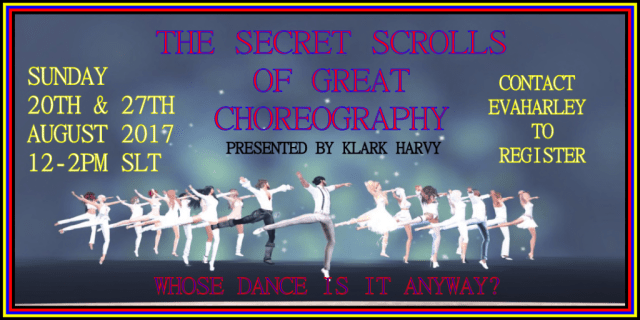
“The Secret Scrolls of Great Choreography”

Tools are only part of the educational journey in Second Life Dance performance.  It is the choreography that truly brings the art and emotion to dance.  Klark Harvy, a very talented performer, creator, director, and artist will be offering additional opportunities for learning and growth!

Klark Harvy will be presenting a hands-on workshop focused on building and enhancing choreography skills.  This is an amazing opportunity as he demonstrates what to look for in animations, linking animations for smooth transitions, and making your dance memorable!  Not only will he be providing instruction, you will also be participating during this workshop!

Two workshops are being offered, class space is limited.  Please contact Eva Harley (evaharley) in world to register.

Session 1:   Sunday, August 20th, 12 – 2 PM SLT

Session 2:   Sunday, August 27th,  12 – 2 PM SLT

SECRET SCROLLS OF CHOREOGRAPHY - Klark Harvy

Posted in Dance Resources, Uncategorized | Leave a comment

Random Places to Visit

Willy Wonka: A little nonsense now and then is relished by the wisest men.

Have not been, vouch for none, a list when exploring strikes my fancy…


The Tower – MadPea
http://maps.secondlife.com/secondlife/MadPea/224/30/2472

Chess Wonderland
http://maps.secondlife.com/secondlife/Egypt/41/18/23

Art Box
http://maps.secondlife.com/secondlife/Missing%20Beckett/16/224/43

Light Thoughts 3
http://maps.secondlife.com/secondlife/LEA20/145/250/23

Through the Rabbit Hole
http://maps.secondlife.com/secondlife/Leodegrance/59/72/70

Lichtbringer
http://maps.secondlife.com/secondlife/LEA2/94/170/24

Neverland
http://maps.secondlife.com/secondlife/Shadewyck/195/133/31

Dysphoria
http://maps.secondlife.com/secondlife/Oxygen%20Island/146/129/857

The Jewell Theatre
http://maps.secondlife.com/secondlife/Samandiriel/206/128/29

The Lost Unicorn Gallery
http://maps.secondlife.com/secondlife/Faerie%20Tale/204/75/125

Art Ark
Art Ark is an interactive experience that takes participants through a series of art quests designed by Dr. Mary Stokrocki, a professor of Art Education at Arizona State. See http://pdx.be/21de for more information.
http://maps.secondlife.com/secondlife/Teaching%2010/60/210/30

Shakespeare’s Macbeth
At Foul Whisperings, Strange Matters, explore this immersive project that involved a creative team of more than 40 artists, actors, sound engineers, designers, and literature experts. This themed island features gaming-style interactivity for individual users to experience in a media-rich environment employing sound, text and animation.
http://maps.secondlife.com/secondlife/Macbeth/47/50/55

The Reading Cafe
http://maps.secondlife.com/secondlife/Las%20Baulas/59/59/32

Worlds’ End Tavern
http://maps.secondlife.com/secondlife/Jeulmun/72/80/600

HHVET Victoriana
http://maps.secondlife.com/secondlife/HHVET%20Victoriana/139/119/22

The Notebook Society
http://maps.secondlife.com/secondlife/Sargas/189/84/21

Bookstacks Isle
http://maps.secondlife.com/secondlife/Awen/111/154/22

Haunted Silent Peacock Hotel
http://secondlife.com/destination/haunted-silent-peacock-hotel

Corpsewood Haunted House
http://maps.secondlife.com/secondlife/Miasma/116/132/25

Post Mortum Designs
http://maps.secondlife.com/secondlife/Ibranic/63/62/3002

Aubrey’s Coffee House
http://maps.secondlife.com/secondlife/Madeley/15/98/21

Shoot The Rapids – Whispering Windz’s Log Flume Adventure
http://maps.secondlife.com/secondlife/Whispering%20Windz/126/96/21

Club Zydeco
As close to a real Louisiana swamp as you can get, with a cajun village. Club Zydeco offers a full schedule of live performers and many things to do for fun including 450m water slide! live performers live music zydeco music motorcycle tracks water s
http://maps.secondlife.com/secondlife/Pengo%20Ceres/160/61/24/


Live Music Search:
http://search.secondlife.com/?query_term=live+music&collection_chosen=places&isLeftColOpen=true&sort=popularity_desc&category=

Camping:
http://search.secondlife.com/?query_term=camping&collection_chosen=places&isLeftColOpen=true&sort=&category=

7Seas:
http://search.secondlife.com/?query_term=7seas&collection_chosen=places&isLeftColOpen=true&sort=&category=

Horse Trails:
http://search.secondlife.com/?query_term=horse+trails&collection_chosen=places&isLeftColOpen=true&sort=popularity_desc&category=

Tai Chi:
http://search.secondlife.com/?query_term=tai+chi&collection_chosen=places&isLeftColOpen=true&sort=&category=

Theatre:
http://search.secondlife.com/?query_term=theatre&collection_chosen=places&isLeftColOpen=true&sort=&category=

Meditation:
http://search.secondlife.com/?query_term=meditation&collection_chosen=places&isLeftColOpen=true&sort=&category=


Posted in Uncategorized | Leave a comment