New challenge, new tool – TROFF

I have a tendency to overextend myself.  As things shift and change, it is always good to re-evaluate.

I’ve already begun the process of creating fewer dances, but hopefully better quality.  Ones that I absolutely enjoy creating and come from the heart, soul, and imagination.

toolbag

One other thing I’d like to do is learn new tools.  If you know what’s out there, have them in your toolbox, then you might open your mind to new ideas, new inspiration, or ways to do things most efficiently.  At first I was going to say a new tool once a week, but maybe a new tool every two weeks.  There are so many things I want to learn, but if I’m going to do it, I should learn it well.  It’s not a marathon right?

nyc_marathon_costumes_05

A moment ago, I reblogged a post from Seb’s NightMagic blog.  My first tool will be TROFF – and it will be an honest to goodness delving in to really learn it, then how I might be able to apply it to creating my own dances.  (Yeah, my skimming the surface a couple times doesn’t cut it.)

So, wish me luck, here’s the link again if you want to check it out too:

TROFF – Chrome App

Next on the list:  what the heck is a UV unwrap and how to make one!

Try something new today, and enjoy!  That’s the purpose right?

~ Eva

Posted in Dance Resources | Leave a comment

Please don’t lick the walls…


There are times when I wonder how to find order in all that’s in my head, some semblance of coherency, and then share it.  If you’ve been around for a bit, you know that’s why I started this blog – all these thoughts and ideas just swirling around, needing to be put to paper.  The blog has evolved over time, a way I can share with others, maybe inspire some to think or create, and also a way I can teach in a way where I can write and edit and hopefully present it in a very understandable fashion.

Last week I tried to teach a friend and fellow dancer the barre hud, just enough for leading crowd dances (damn, and now I realize I forgot to convert her Smooth Dancer sequence to the barre hud format…makes a note).  I’ve been doing crowd dances for over a year now, absolutely love them and have used the barre hud for every one of them.  I could feel my tongue twisting as I tried to explain it, and think I managed sort of…  Writing helps me put my thoughts in order (which I hadn’t done), then helps me speak it coherently later.  It’s like anything really, the more you use it, the more you explain it or think through it, the more comfortable you are in doing it.

I’m in the process of re-evaluating my workshops.  I love teaching, the symbiotic relationship, the shared inspiration and passing on what I have learned over the years.  Sometimes I can feel the information connection, sometimes I know the topics are difficult.  Some workshops get quite a bit of interest, others not so much.  I’m working on this, wanting to understand what people want to learn, what works best, how they enjoy learning, and what helps make it “stick”…and mesh this to my own enjoyment in teaching.  I like to teach tools and foundation, and I think I will be expanding on this.  I will never profess to be an expert, but together I think we have a lot to share and learn.   I read this quote, and now keep it in a place I read every day:

The mediocre teacher tells. The good teacher explains. The superior teacher demonstrates. The great teacher inspires. – William Arthur Ward

I strive to be a teacher that inspires.  To continue to grow not only as a teacher, but as a  choreographer, dancer, and fellow student.

I love tools, absolutely adore them, and pick them up easily.  I don’t speak of it often, but in RL I’m a Systems Analyst.  That is my job, to evaluate, to understand the tools and the data inside out, to find ways to make things better, faster, more efficient, and when it’s not working figuring out why.  To make them sing.  I love puzzles and solving them, the hyperfocus I use when creating a dance.  I also feel such passion for what I create, I pour a piece of myself into my dances and into my workshops.  It’s when I feel burnt out, or question myself, or become slack and unprepared, that I know I need to stop and re-evaluate.  I’ve been all over the eastern half of the US teaching, but in all of that, I’ve never felt the connection I do, the joy and passion I do, as when I teach in SL.  Dance and teaching in SL make a difference in my life, and I’m so very thankful to have a forum to do this and for the people who come and walk away, hopefully… inspired.

My workshop group is open invitation now, Harleyquin Workshops.  I welcome all who are interested.  I believe in having many teachers, exposure to different ideas and ways are a great thing.  I greatly enjoy the teaching of others too, and feel that’s the way it should be.

My mind rambles a lot, these posts often write themselves without directed thought (the musings do anyway).  Whether you attend my workshops or not, don’t agree with my methods or style – that is completely ok.  I recognize and appreciate the differences in everyone, the strengths and methods, and support you in your own journey and growth.  I thank all of those who have been so open in teaching and/or sharing with me, giving me the opportunity to perform (even when my monochrome set was sepia and I had to fix it!).

I’ve been watching quite a bit of Bill & Ted lately sooo…..

“Be excellent to each other…
                                           and…. [dance] on dudes!”   

~Bill S. Preston, Esquire & Ted Theodore Logan

Eva

PS – I’m soooo going to put up some of that Willy Wonka lickable wallpaper in the classroom area!

Posted in Musings | Leave a comment

TROFF – Chrome App

Sebastain Bourne's avatarNight Magic

Figured I’d follow Eva’s example and put this training here on the blog, especially since I keep telling her she needs it.  I of course am not as good at this as she is but I will put what I have here.

Disclaimer:
I am not paid by Google or Troff.  I do not profess to know everything there is to know about this program since I really only use it to create my PD notecard.

Download Troff at
https://chrome.google.com/webstore/detail/Troff-training-with-music/

So let’s get started:

Slide2

TROFF is a program designed to help musicians with their music.  It is a Music player that plays mp3s and mp4s and lets you loop a song or video, slow it down, and create markers with notes on the song timeline. It is a good tool to use if you need to practice something to music; if you are a dancer working on choreography; or a musician…

View original post 2,054 more words

Posted in Uncategorized | 2 Comments

Transitions, beginnings, and amusement park rides…

Sometimes, you reach a point.  Wondering what you are doing here in this world, as you dash from dance to dance, responsibility to responsibility, enjoying what you do until suddenly…you feel it…

This deep burning from inside yourself, a change that no one else can see.  Letting go of things that you held onto so very tightly.  Things you wanted so badly it hurt sometimes.  Have you ever seen a picture where you looked at it, and you saw something…then you stepped back and it was totally different?

With this inner fire raging I knew change was coming, but I didn’t fear it though it was so overwhelming at times it felt like it would consume me.  I opened up, to letting go of past relationships and saying goodbye, past longings and hopes, my way of over scheduling myself  so much that I lost the opportunity to enjoy creating things that made me truly happy and proud.

710a2a14fd66b020b74d133f5e0a30f8         phoenix

During this transition many amazing things happened, old hurts were healed, fears were overcome, and the air was cleared of misconceptions and misunderstandings.  Other things were more difficult, but had to shift to clear the way for new focus, new discipline within myself, to find the strength and confidence that has always been within.

Now, I refocus on my creations, to be true to myself, to be the friend I should be and the leader and supporter of my most amazing dance troupe.  To be the person that will be there for them when they need me, to pick  up the pieces and pick up the communication line.  To not hide behind a rock or so lost in creating that I forget the people around me.   To let them know how grateful I am, how much I believe in them, in word and in action, and to do whatever I can to support their growth.  To follow through on obligations made to others, without procrastination.

I am still contemplating my workshops, self-evaluating, asking myself why I teach.  Other questions roar through my head, do I present in a way that other people take away what they hoped to learn, do I present it in a way they can relate to, are they topics people want to learn.  Do I exude the confidence and knowledge they expect of a teacher?  Should I limit and focus my workshops, and how formal should they be?  This is still something I’m working through.

Time…and balance will always be a challenge, but I’m thankful to be off the merry go round.  There will be a few rides on the roller coaster, maybe a few rafting down the lazy river occasionally, but there is a whole amusement park of opportunity and experience.

I am not perfect, not an expert and never profess to be.  Like you, I am learning.  I learned something this weekend, but now I forgot it so now I need to contact my workshop attendees and ask if they remember what it was 🙂

Change and transition aren’t easy, but they are a part of growth and can open the door to new and amazing experiences.  Don’t fear it, but see it for what it is.

In parting, this song speaks to me..and the different parts of myself.  Self doubts, questions, and overcoming challenges.  Within, you are stronger than you ever thought you could be.  Finding that person will evolve over time…every step bringing you closer.

Live in peace, for you are special
~ Eva

Posted in Musings | Leave a comment

Tips & Tricks – Stage Manager

Tips & Tricks:  Sometimes I wish I knew everything, but then my head would swim with misc stuff, not to mention I enjoying learning from others and do so every day!  There are always multiple ways to do things.  What I share is based on my own research and knowledge, not as an “expert” (far from it), but someone passionate who wants to share as others have shared with me.  Take it for what you will and dance.  ~ Eva

Spot On Stage Manager:
https://marketplace.secondlife.com/p/Spot-On-Stage-Manager/6977211

  • Set rezzer, responds to chat commands
  • Rezzes sets based on the center position of the venue stage
  • Integrates with the Choreo Design system by adding “offsets” to your mover notecards to ensure your movers are always positioned in the correct place for your venue
  • If you also use Performance Director, can load multiple dances into your PD, multiple mover cards into your movers, and by selecting the routine on the PD will move your movers into the start position for that dance

Note:  some of this information comes from the spotonsl.com website, aggregated here.

Misc Facts & Tips:

Make rezzing your set and clearing the stage easier.  With the Performance Director:

@button1=RS:42:set name
@button2=RS:42:clearstage

this assigns the button, RS is region say, 42 is the default channel for stage manager, and set name is the EXACT name on your notecard.

You can also rez and clear your stage in your Performance Director as a timed event!

You’re not limited to the PD either, you can easily create a hud that will rez and derezz your set at the touch of a button.  You will need the channel number, and the commands:  <set name> to rez your set, and <clearstage> to clear your set.

Stage managers you own should not be rezzed within 96 meters of each other.   (this came from the Spot On website)   If on a building platform, you can have multiple platforms 100m apart in the sky, each with their own stage manager.

I keep one master stage locations notecard in my inventory.  Every time I go to a new venue or add a new building platform and get a new location, it is added to my master notecard.  Whenever I rez a new stage manager, I replace the stage locations notecard with my master one.  (Make sure it’s always the same name – I named the folder “Master”, and kept the notecard the normal Stage Locations notecard name.  This makes it simple to take my dance to a different venue.

On my building platforms, I leave out my stage position marker.  When I start a new build, this gives me a visual to make sure the new set template is in the right place, or if I’m stretching the set template, etc.

I use one stage manager per dance, for me this makes it easier when performing it other venues and set pieces like “prim lights” don’t get confused.  The only time I put multiple sets together is when I’m performing multiple dances at a venue, and I don’t keep that copy permanently.

“Build, Object, Save Back to Object contents” is your friend!  This is on your main toolbar.  If you’ve rezzed a set and just need to make a minor change – color, fixing a fade configuration notecard, etc., make your change.  After the change is done, click on edit, then from your top toolbar select Build, Object, Save Back to Object contents.  Re-rezz your set and you should see the new change rezzed.  You can even link additional prims or edit linked prims in most cases, then save back to object contents.  More details below.

When you have faded prims in your set – if your set will include prims that will be faded for the start of the dance and visible later, make sure they are faded when you pack your set.

I created a “new build” stage manager, preloaded with a “build” set.  This set has the stage template and prim lights in it, already in position, plus my custom color and picture for the front of the stage manager.  When I’m creating a new dance, I rez my new build stage manager, rename it, rez the build set, then immediately start building.  Before I pack my new set I rename the pieces and save it with the name of the dance.  Saves a lot of time and I can start working right away.

I’ve started keeping a “master folder” for each dance.  In my inventory, I have a folder for each dance and everything I need organized – huds, movers, stage manager, etc.  When I perform at a venue, I rez the stage manager and movers.  After I’m done I delete them because I have the master copies in my inventory.  (I only use copy animations, make sure your stage manager IS copy before deleting it.)

I’ve also started keeping a master box for each dance in world.  There are multiple ways and tools to do this, but within the box I place a copy of the movers, huds, stage manager, notecards, anything I need to perform or may need for the dance.  If something happens to my inventory, if I accidentally delete the stage manager, or mess up the set, I can go back to the box.

I only reset my stage manager when I change the stage locations notecard.  I don’t do it after packing a set or changing a saved set – I haven’t found any need to…

When rezzing out a stage manager, I *always* reset it and make sure it’s configuring for the right stage.  Especially if I’m on build platform 3, and I see it’s resetting for platform 2, I know I need to check my stage locations notecard.

If your set is rezzing and facing the wrong way – rezz the position marker again and make sure the arrow is facing the audience.  Rotation is just as important.

Never use anyone elses coordinates.  Ask three people and you will get three sets of coordinates.

When using the position marker to get the coordinates for a new venue, always make sure you have an exact rotation coordinate.  On the position marker, go to edit, properties, and check rotation.  It should be in increments of 90 degrees.  If your position marker is rotated 88 degrees, your sets will rez crooked.  You can manually type 90 in the box.

If your set isn’t rezzing in the right place, double check your stage coordinates.  Reset your stage manager.  If those are correct, double check your set notecard.  The numbers you see next to each set piece is the offset – the distance away the object should rezzed based on the CENTER of the stage.  If this is a really high number, it means when you clicked “get notecard” when you originally packed it, it was probably “talking to” a different stage manager you have rezzed.  Make sure you only have one stage manager within 96 meters, make sure you have good coordinates, reset it and check that it’s resetting for the stage you want, and get a new notecard.

If your set isn’t rezzing in the right place, it can also be where you built it.  Stage manager works based on the center point of a stage – whether it’s the venue or a building platform.  Everything will always be remembered and rezzed based on those coordinates.  When building your set, always make sure your set is positioned “center stage” as the Stage Manager expects.  If you plop down a template willy nilly, build, then pack it up – it will rezz at the new venue based on where you plopped down your template on your build platform, and what center stage is.  20m too far to the right when you build?  It will rez 20m too far to the right at the venue too.  This is why I keep my position markers rezzed on my build platforms.

Stage markers – the stage manager eliminates and far supersedes the older triangular stage markers.  If you are rezzing and repacking and older set, make sure you get rid of the stage marker.  The stage marker will try to battle for domination with the stage manager and your set may not rez in the right place.

Always link your sets as much as possible – this will make it easier for your set to rez and give you fewer pieces to pack.  If you prim count explodes when you link pieces, there is a physics mod script that will correct this.  (It changes the prims to convex hull).  If you need it and don’t have it, feel free to contact me.  If you have prims that do things – like rotate, animated textures, have candle flames, etc. – don’t link those pieces as it might effect the script.

Sets should always be phantom.  This will allow you to walk/dance through your set, but it also reduces lag.  When an object is not phantom, the system monitors for “collisions” between set pieces and also the set and avatars.  Phantom makes your set invisible to the servers, reducing lag.

For every venue where I take a stage position, I name and keep a copy of the position marker.  Example:  ORIGINAL ELYSIUM Spot On Stage Position Marker.

Whenever I want to double check or adjust my stage location position, I rez this to last position and make my adjustments.  If I change it, I delete the copy in inventory, and take back the rezzed one – so I only have 1 original.

Temporary Adjustment of Stage Location:

Ever have a set that is just not rezzing in exactly the right place?  Maybe you accidentally stretched the set, or some other reason.

You could repack it, but maybe it’s just an issue on one particular stage.  Sometimes, I will adjust my position marker for that stage, maybe move it forward a bit more then take new coordinates.  (Delete this position marker when done.  DON’T keep it.)

In the stage locations notecard in the rezzer, I add a # in front of the normal stage coordinates, then I paste in the new stage coordinates, naming the stage the venue and the dance – like “Paramount Carousel”.  When I pull out that dance 3 months later, I know I had to shift the rezzing location for that venue for that dance.

Note:  The # tells the stage manager to ignore that line.

 Standard Stage Objects in your Set – Save Time:

I have standard set objects, such as prim lights that I use in many of my sets.  Instead of always having to rez the lights, put them in place, take a notecard, I keep the prim lights in my “building” stage manager.  I also have a notecard with the standard position for the prim lights.

If I want to add them to my set, I simply copy that line to my new set notecard.  No extra work and they rez with my set.  This can be applied to anything you normally use – copy/mod effect rezzers, light bars, etc.

Changing Your Set on the Fly:

You have your dance packed in the stage manager, rez it out, and realize you want to change the colors, add a linked part, or even change the positioning of a linked part.  You CAN do this easily

Changing textures, linked objects, adding removing linked objects (not root prim):

A little background:  The root prim is the “main” part of the link.  I always use a main piece, such as the set surround as the root prim.   When you link objects, the last object selected becomes the root prim.  All other linked objects are called child prims.

  1. Rez your set
  2. change a texture, add a linked prim, move a linked prim (not the root prim)
  3. from the top menu select Build, Object, Save Back to Object contents.  This saves it back to the rezzer.
  4. Derez your set and re-rez, you’ll see your change was saved.

Don’t see the object to save back to object contents?  You may have re-rezzed it, changed something enough so that it’s no longer recognized as belonging to the rezzer.  Take your modified set piece and replace the copy in the rezzer.

Changing where a set object is rezzed:

If the object is not being changed other than position, get a new notecard from the stage manager and update the line in the set notecard in the rezzer.  No need to replace anything else.

Making major changes/changes to the root prim:

I would treat this as a new object.  Get a new notecard, update your set notecard in the rezzer.  Remove the old object from rezzer contents and replace wtih the new.

Copy/No Mod Objects in the Stage Manager:

Have an amazing set piece that you *must* use, but it’s no mod – so you can’t put the stage manager script in it?

You CAN use copy/no mod objects in the stage manager.  They will rez, but after you will need to delete the object manually.  I call this the “Slip and Slide”

  1. rez your copy/no mod object exactly where it should go on the set
  2. rez a simple box
  3. name the box with the exact name of the no mod object
  4. from the edit menu, use the “C” button on your no mod object to copy the position
  5. open the edit menu on your simple box, using the “P” button, paste the position.
  6. Your box should now be sitting in the same position as your no copy object (they don’t need to be the same size).
  7. Get the notecard from the stage manager.
  8. Copy the line for your box (which has the same name as your no mod object) into the set notecard.
  9. Put the copy/no mod object into the stage manager
  10. delete the cube
  11. Rez your set – your copy/no mod object should be rezzed in position
  12. De-rez your set, and manually delete the object.  (It won’t delete automatically because it doesn’t have the stage manager script in it.)

NOTE:  This only works for copy/no mod objects.  Do not attempt with no copy objects.

Working with Multiple Template Position Requirements on the Same Building Pad:

The stage manager was designed for only one to be rezzed within an area, and for only one stage location to be used.  This can be a challenge if you’re building for different types of stages on the same building platform that may require a different building height from the ground.

Example:  The Elysium template is generally built flat from the floor.  Paramount you may want to build raised because of the front runway and stairs.

You can do this on the same pad.

  1. Rez out your position markers for each template and put them into place.  You may even want to rez the stage templates too to make sure you have them where you want them.
  2. Take the stage locations for each
  3. Add them to your master stage locations notecard
  4. Replace the notecard in the rezzer with your updated master locations notecard
  5. Within the rezzer, add a # in front of the stage you are NOT using.  Example:  If you are building with the Elysium template, put a # in front of the Paramount stage for that building platform.  If you are building with the Paramount template, put a # in front of the Elysium stage for that building platform.
  6. Reset your stage manager.  You should see it’s configuring for the appropriate template on that building platform.

Create a “Building” Stage Manager:

Many of the venues now use a standard size building template.  I create a “building” stage manager to make building easier.

  1. On my building platform, I layout my position marker which is the same size as the stage template.
  2. I take the coordinates, update my master stage locations notecard.
  3. I rez a brand new stage manager – clean from the box.
  4. I delete the stage locations notecard in the stage manager and replace it with my master card.
  5. I set out any basic building things I need, the set template, prim lights, etc.
  6. I add the scripts, get the notecard.
  7. I then create a new notecard, paste this information and name it “New Build”
  8. I also add a blank notecard called Set.  This is for the set I will build later.
  9. I name the stage manager something unique, adding “2017 Builder” to the front of the stage manager object name.

Whenever I need to build a new set, I rez this stage manager on a building platform.  I can then immediately rez the New Build which has everything I need to get started.  You could also have multiple “New Build” templates if you often work with stages of a different size.  Just rez the right one and away you go!

Don’t forget to name the Stage Manager right away!  This saves having a bunch of unknown stuff in your inventory 🙂


ISSUES I’VE SEEN:

Set not rezzing in the right place:

  • current stage location isn’t accurate
  • when the set was originally packed, the stage location/position of the build wasn’t correct
  • the set objects aren’t phantom and may be colliding
  • stage manager not reset.  Always reset the stage manager so that it can read the current coordinates
  • stage manager not resetting for the correct stage.
    • make sure you have the correct stage in your notecard
    • make sure not to have a # in front of the stage name
    • make sure to have all the pieces, stage name, sim name, coordinates.  Sometimes the sim name is accidentally removed when renaming the stage name in the notecard.

Set piece is rezzing on top of the rezzer:

  • make sure the set piece has the stage manager script in it
  • make sure it is listed in the notecard correctly

Set piece isn’t deleting:

  • make sure the copy of the object in the rezzer has the stage manager script in it


Posted in Dance Resources | 1 Comment

The Official Book of Dance Rules

The truth is, there is no “official book of dance rules”, just as there is no supreme guru on top of the mountain with all the wisdom you seek.  Your own ways, your own style, is meant to be discovered by you.  Venues have their own guidelines, but the core of dance is for you to create – YOUR WAY.  Find what works for YOU.

Now, to me, there are two key “rules” in the world of dance, found below…but rules were also made to be broken…  you decide.


You’ve been all over the grid, taken notes, experienced shows, and your passion is off the charts and you’re ready to create a dance NOW.

You may be asking – “WHAT DO I NEED, I HAVE ANIMATIONS, WHAT DO I DO FIRST???”

Dance in SL is this unbelievable creative experience.  It does take dedication and hard work to make it worth it in my opinion.  I promise you, you will laugh, you will cry, bang your head against the wall, and spend more lindens than you thought.  There are ways to be resourceful, but creating a dance in SL is not a free hobby.  I highly encourage you to be sure it’s something you feel passionate for before investing.  Do not do it for the applause, do it for YOU out of passion and the need for expression.

Wait, you might be wondering why people do this if it takes dedication, lindens, and even tears…

Dance in SL is an expression of creativity.  The creator may use many different tools to explore and to create in their own way.  Some love building sets, or putting together choreography.  Maybe they use audacity to create custom music files, or put together unique costumes.  Others enjoy working with Photoshop to create textures and pictures for their sets.  Others like the challenge of scripting and creating special effects.  Opportunities for growth and vision are almost endless.

Many of us here in this world have never been nor will ever be professional dancers.  Others were, but now express their love of dance through Second Life where there is no brittle bones or arthritis.  Bodies are whole and strong, and everyone can perform even the most complicated dance moves.


Alas, there is a wondrous beginning, an alternating amazing and frustrating middle, and never any end.  The beauty of dance in SL is the endless opportunity for creativity, expression, and change.  There are no hard and fast rules, there are different opinions on everything, and very few absolutes.  What I write here is based on my own experience and knowledge, and how I learned.  This is not gospel and I welcome input from other dancers.  May a few learn and be prevented from repeating my own mistakes.  Let’s begin shall we?

RULE #1:  Question EVERYTHING.  Well almost everything, EXCEPT rule #2.  There are so many tools, ways to do things, venues, styles.  Never take anything someone says as gospel.  Consider it, try it, see what works best for YOU.

RULE #2: ALWAYS ALWAYS ALWAYS buy copy versions of animations.  When you begin buying animations, you will generally have the option to buy a copy version or transfer version.  Transfer version you get 1 copy of an animation.   If you put that into a dance HUD, there’s your one copy.  If you want to put it in another HUD for another dance – oops, you have to pull it out of the first HUD.  If you delete that HUD – *poof* it’s gone forever, no passing go, no collecting $200.

If you buy copy versions, you can put that animation in multiple dance huds, an animation organizer, under the kitchen sink, and that safe under the bedroom floor.  (Didn’t think I knew about that, did ya?)  Copy versions can cost a bit more, but they are more than worth it for the ease in using them and the ease of mind of never accidentally deleting thousands worth of lindens in a hud accidentally!  Say it with me:  ALWAYS BUY COPY VERSIONS OF ANIMATIONS

But wait – what if an animation I love is only available in transfer version?  99% of the time I still pass it up and always find one that works.  If you MUST have it, make sure you keep it in a special folder, and store your HUD in inventory in a way so that you know never to delete it.  (Name the HUD or name the folder it’s kept in)


STOP!  Don’t rush out and buy a HUD and a slew of animations just yet.

Read:

Don’t Rush into Using All the Tools! Build a Strong Foundation

Tie around the head is encouraged too…if dance isn’t fun, why do it?

Dance-Rules-Ivory

Posted in Dance Resources | 2 Comments

The Sirens Call – a beginning for the new dancer

“Begin at the beginning and go on until you come to the end, then STOP”  
     ~ Alice in Wonderland

You feel the call.  Perhaps it was a performance, perhaps an impulsive inspiration from above, but whatever drew you to dance you now have a passion to create and be on that stage.

It can be a little overwhelming, where to begin.  It’s easy to buy the tools, buy the animations but to truly create magic, to weave a store within your performance – the music, the movement, the set it takes a focus on foundation, passion, and dedication to truly bring out your full potential.  Sound a bit difficult?  In a way it is, but in others it’s a most incredible journey where you will learn, you will feel, you will meet amazing people.  You will never listen to music in the same way again.  You will feel it, you will experience it, you will soar with it, and for some pieces of music, you will see it in your head unbidden, just there.

I can hear you now… “I want to create that…I want to be on the stage…what do I need…where do I go????”

Pause.  Breathe.  Slow.  

Before we dig into the details, go to shows.  All over the grid.  Experience the different styles, different choreographers, different feelings of each venue.

Every venue has its own feel, its own style, the way the show is run.  Experience it as an audience member, see what appeals to you.  What style of dance are you most drawn to?  What do you enjoy most about what you see?  What is your opinion on your experience at each show and venue?  Keep notes about not only what you did like, but also didn’t like, and any questions you have.  This will help you define what appeals to YOU and if it’s something you want to invest in.

Don’t ever compare yourself
Don’t ever doubt you could do “that”
Strive to create from within, and you will find your own style over time
Most of all, never be afraid to fail.  Never be afraid to try

See how the choreographers use animations to fit the music, how they use the animations, how smoothly they transition.  What music moves you?  Listen to music on youtube, make more notes, again what music moves you.  DON’T WATCH THE VIDEOS.  Don’t strive to re-create the video.  Dance is about your OWN expression of the music.  Don’t doubt, second guess, just free write and let creativity and ideas flow.  Start a dance journal – a notebook, a private blog, spreadsheet, document, whatever works for you.  A place to keep your ideas.

Spend at least a couple weeks going to shows, many different venues, with this new mindset.  Really immerse yourself.

Dance Queens is the ultimate resource for upcoming shows:  http://sldancequeens.blogspot.com/

Dance Queens calendar:
http://dancequeenscalendar.webs.com/apps/calendar/

I do suggest adding Club Image to your places to visit.  To me, they are a level unto themselves and a true experience in magic and inspiration.  Explore EVERYWHERE over the grid, poke in the corners.  There are so many venues, far more than are even listed on Dance Queens.  Use search to find them.

Most of all ~ Enjoy

Posted in Dance Resources | 2 Comments

Just breathe…

I ramble, thoughts revolving in my head in their own sort of dance.  Pen put to paper, fingers to keyboard, as I share from the path of totality, in more ways than one.

A feeling of softness overwhelms me, of peace.  That all is right with the world.  Of letting go, and of welcoming in, openness.  The song changes within my soul, this one so very personal, from deep within.  Close your eyes, can you feel it?  Connected to all things, one.


There are times when I wake with a song already playing in my head.  Thankfully I can almost always understand the message, feel it, and that I’m not being rick-rolled from crazy dreams.  Music, and dance, can mean different things to each of us, depending on our own emotions, beliefs, knowledge in that moment.  What could be perceived as a very emotional song about loss, could also speak of hope, letting go, of remembrance, and of change.  There is a power and a peace in recapturing our energy…letting go of what was, with nothing but love and trust in our hearts, of good will.  People, places, situations, beliefs, dreams, all of it.  Everything has its moment, but nothing lasts forever.  The curtain falls, the lights dim, the darkness welcoming rebirth and renewal.  A new scene, a new dance.

Do not be afraid of change.  The pain, the anxiety, the fear will pass.  Believe in yourself.  Dance for yourself, create from your soul, and give it your all – for you, and no one else.  You ARE special, and you can do anything you are determined to do.  Believe, trust, and the people you need, the resources you truly need, will fall into place.  You will find a way.

Soften your eyes, breathe deeply, relax your mind and follow your instincts.  You can do so much more than you realize.  You are so much more than you realize.  There is no need to be told you’re special, or needed, or important.  You are all those things, and so very much more.

Dancing on my own, giving my all.  For me.  Breathing deeply as my body naturally flows with the music without conscious thought.  Feeling, filled with nothing but light and hope in a dark room, emotion pouring from my being.  The curtain rises once again…and I know all is just as it is meant to be.

Dance the music within your soul.  For you. Always.

~ Eva


Posted in Musings | Leave a comment

Inspiration, ideas, and get all these ideas out of my head for a bit!

having ideas

There are times where there are so many ideas swirling around in my head that I just can’t think or focus.  It’s like a huge pile of spaghetti in there and I’m afraid I’ll forget all the best ones.  Sometimes I’ll even wake up in the middle of the night, thoughts DEMANDING to be written.  It is after I’ve let them take their course, written them down, that I can finally settle again and sleep.

I’m also a list maker – I NEED lists.  They help me stay organized, they help me remember, but most importantly they reduce stress for me.  I KNOW what I need to focus on next, I know what steps I need to take to put together a dance.  I don’t have every little detail, but it’s like candles along the path lighting the way.

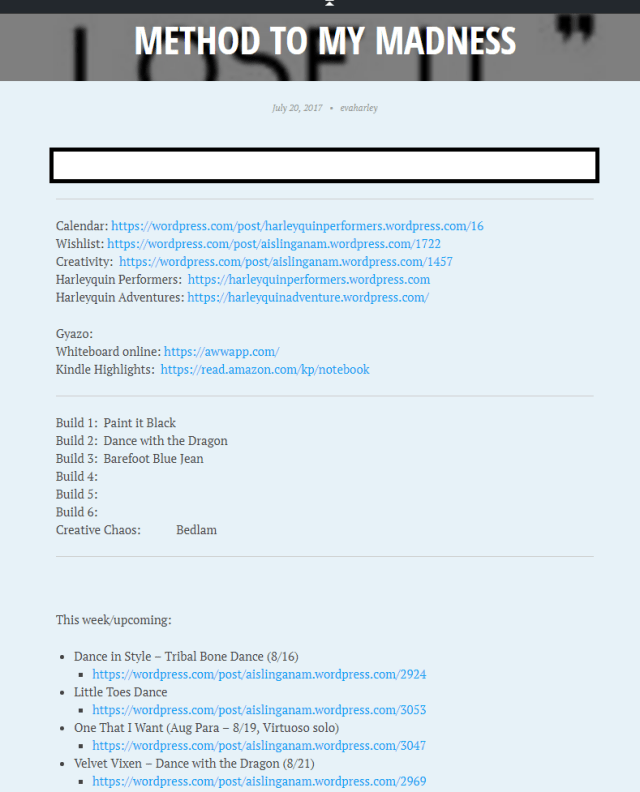
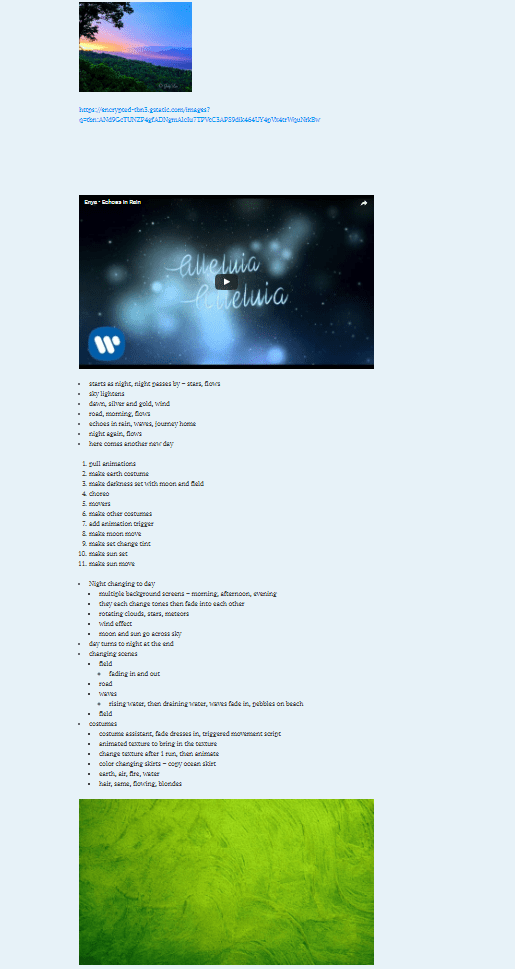
I’ve tried many different things, but my favorite is my private blog I use for my own brainstorming, my own thoughts, things I don’t want (or would scare) the outside world to know.  I have one main post where I keep links, and to do lists, and what not, then each dance I create, each workshop, has it’s own blog post that I just keep updating.  Words, pictures, video links, marketplace item links, all of it I can keep in one place for that dance.  A creative scrapbook.  Just for me.  Doesn’t have to be pretty but it’s an incredible resource so I can put all my ideas down when they come to me, then when I’m ready to work there they are.

I even have a post of my favorite stores to visit for all kinds of things, and a wishlist of items I like on Marketplace that I just don’t need right now but want, and don’t want to forget.  (Saves lindens too, because I’m not anxious to buy it right away “because I’ll forget and it’s soooo awesome!”)

I think it’s so very important to write down your ideas when inspiration hits – songs you want to make a dance to, thoughts, ideas, frustrations, absolutely anything.  It’s like a creativity diary, and when it’s time to make a dance or find create a new one you have all of this at your fingertips.

Soo….

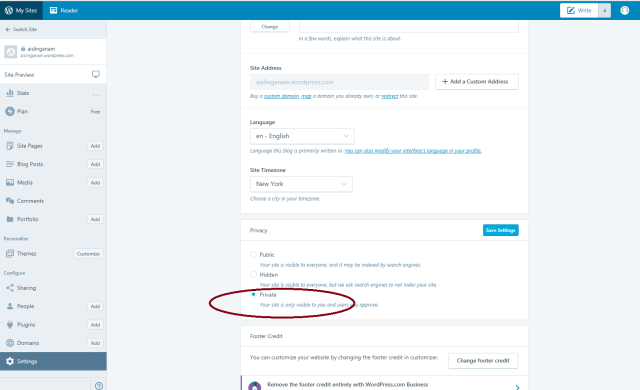
I use WordPress for my private blog, free version.  There’s a simple setting to make it private so no one can access it without a log in and password.  There’s a little bit to get used to if you’ve never blogged before, but..

Make it yours!

Use it the way YOU want!  Sort it, organize it, lay it out in whatever way works best for YOU!  For some people, it may be an awesome thing, for others you might like to keep your ideas in a different way.  That’s ok too!  A private blog is a tool for your creativity – nothing more.  Always work, create, and be just the way you want to be.

I hope this may have given you new ideas, or inspired you in some way.

Dance to your own beat, always.

~ Eva

WordPress setting to make private:

setting


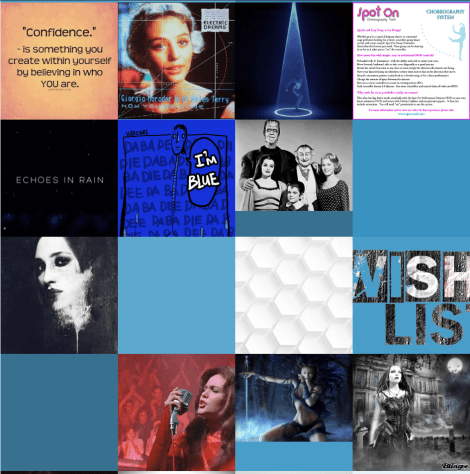
This is what mine looks like when I log in.  You can see some of the dances I’ve worked on or want to work on, my workshops, even a post for inspirational messages.  Some I didn’t assign a picture to yet, but if I hover over them it will tell me the name.

blog pictures

This is what my main planning page looks like (it keeps going!):

method to my madness
and this is one of my planning pages, or a piece of it with pictures, videos, links, lists, and rambling:

performance brainstorming

Posted in Dance Resources | 1 Comment

One foot in front of the other…

Foundation.  We all know it, how important it is to have a strong foundation when building a house, getting married, or learning to ski.

When you ski for the very first time, do you go to the black diamond trails and say “how hard can this be?” or “everyone else is doing it!”   No!  Because with the best of luck you’d end up in the trees, worst of luck you’d ski right off a cliff because you didn’t have the basics under your belt!

I see this all the time.  A new choreographer rushes out to buy all the tools “everyone is using” and immediately wants to start creating a dance with the Performance Director.  Now, I love the Performance Director.  It is like the conductor of an orchestra bringing all the pieces together, but….  no matter how great the conductor is, if no one has learned to play the drums, flute, or violin, it’s going to be just like elementary school band where Jimmy just couldn’t keep the beat and Robin smacked her flute against Billy because she couldn’t get it to work!

I have seen a few new choreographers take to the tools like a duck to water and put together something good – but dance is sooo much more than the tools.  It is art, it is expression, it is creativity.  This comes from within, this comes from time and building a foundation, getting to know your animations, listening to music, and starting with the basics.

In my opinion, to create the best performances you need a strong foundation.  To gain a strong foundation you need to focus on the choreography FIRST, and focus on learning one tool at a time until you’ve mastered it.

TOOL 1:  SPOT ON SMOOTH DANCER (animation HUD)

Start here.  Collect animations, work on choreography.  Create a DANCE.  You CAN perform with only a Smooth Dancer HUD and a stay pad!  Some of my favorite dances recently created only use 1 or 2 moves!  That’s it!  Learn to record sequences, smooth out your transitions.  Smooth Dancer isn’t the only animation HUD, but it’s my favorite.  Twenty animations on a page, clean interface, ability to record sequences, and create timed and untimed sequences on the same notecard.

TOOL 2:  MOVER SYSTEM

You’re comfortable with beginning choreography, you have animations, you know how to select ones that fit to the music and are from a variety of makers, you’re still working on smooth transitions but not doing too bad.  You’re comfortable with the Smooth Dancer HUD.   NOW move onto a mover system.

There are several different ones available.  Choreography Designer is my preferred mover system for what I create now, BUT IT IS NOT THE ONLY ONE.  There is no need to get lost in waypoints, create a bazillion routes and rotations for your dancers.  Let your animations do most of the movement, and if needed, and a move or two using one of the mover systems available to get started.

What ones?  Klark Harvy offers classes on the DBC (dance ball controller), a free tool with an easy interface.  This is the easiest one to start with.  Club Image uses the SZI mover system, for example.  When you’re ready – learn the Spot On Choreography Design system but START SIMPLE!  You usually don’t need more than a few waypoints when you’re starting!  More than once I’ve heard muffled screams because a new choreographer jumped into the choreography designer system right out of the gate with complex ideas and were sobbing under a pile of triangles.

TOOL 3:  PERFORMANCE DIRECTOR

IF you choose to, and you’re comfortable with Smooth Dancer, choreography, creating sequences and the Choreography Design System THEN add the Performance Director to your tool library!  To use it effectively you truly must understand the first two tools!

I teach all three, I love all three, but it was an evolution as I built my foundation.  As Alice said, start from the beginning and keep going.  Put one foot in front of the other, build a strong foundation and focus on the joy, art, and creativity of a dance rather than the tools or the “extra” stuff.  Without choreography, there is no dance.  Begin there.

I am in no way an expert, “Master Choreographer”, or any of that.  (a term I detest and personally don’t believe in).  We are all learning, evolving, exploring new things.  Someone can create amazing dances, but be completely unfamiliar in how to choreograph a powerful dance for all men.  There are few hard and fast “rules” in my eyes when it comes to dance in SL, but there are two.  1.  NEVER EVER EVER EVER buy transfer only animations.  Copy, copy, copy versions – ALWAYS – when you can.  2.  Build a strong foundation, learn slowly, enjoy the ride.

Follow this, and dance in SL may be one of the most amazing adventures you experience.

~ Eva

I leave you with two videos for today, and a quote:

“Great dancers are not great because of their technique.  They are great because of their passion.”

“One foot in front of the other
Take one step then take another
Keep on walkin’, we’re headed in the right direction
Puttin’ one foot in front of the other
Little by little gets a whole lot further
Hittin’ our stride, one foot in front of the other

We’re takin’ it nice and slow
Safe and sound, covering ground
Steady as she goes”


Posted in Dance Resources | 3 Comments